

Dragon Legal (Windows)
Speech recognition for legal professionals and attorneys
Focus on clients while Dragon does the paperwork
Fast, fluent, flexible Dragon Legal speech recognition enables you to accurately capture and format specialized legal documentation by voice—at your desk or on the go. Robust legal transcription capabilities and powerful customizations can be easily shared and deployed across a practice or legal department.
Ready for where you’re headed
The premier speech recognition software for both front-end (live speech-to-text) and back-end (transcribed from audio files) applications, Dragon Legal v16 is optimized for Windows 11 and backwards-compatible to Windows 10.
Fluent in business of all sizes
Now serving the needs of both individual and group deployments, Dragon Legal is the speech recognition solution of choice for attorneys. From solo practitioners to large firms, legal professionals experience the same documentation productivity benefits.
Incomparable speed and accuracy
Built with a specialized legal vocabulary, Dragon Legal dictation software is 3x faster than typing and allows you to efficiently dictate and format contracts, briefs, legal citations, and other documentation with superior accuracy, right from first use.
Make routine “flat-rate” work economically viable
Don’t lose out to “one size fits all” legal services websites for routine work. Use Dragon Legal v16 in combination with junior associates to accelerate productivity while adding personalized value to even routine work—all in a way that is economically viable to the firm.
Our latest AI-powered speech engine
Powered by Nuance Deep Learning technology, Dragon achieves high recognition accuracy while dictating, even for users with accents or those working in open office or mobile environments.
Automate repetitive workflows
Create custom voice commands to insert standard clauses into documents or create timesaving macros to automate multistep workflows by voice. Once created, share customizations across the user community for efficiency gains.
Built with accessibility requirements in mind
Dragon Legal v16 extends Windows 11’s stellar accessibility experience to document creation and command and control functionality. Mouse-grid on multiple monitors, “play that back” audio of dictated text in the user’s voice, and sophisticated macro commands are a few capabilities that serve legal professionals needing accommodation for physical or cognitive disabilities.
Empower employees with a Nuance PowerMic option
Faster and more convenient than using a headset microphone, PowerMic is ideal for on-the-go situations or for high levels of dictation. Users can switch back and forth between dictation and other tasks or program buttons to automate steps such as advancing sequentially through form fields.
Dragon can follow you everywhere—it’s mobile made easy
Extend your practice-wide documentation capabilities with professional-grade mobile dictation allowing legal practitioners to create, edit, and format documents of any length and share information directly from a mobile device. All on-the-go customizations—from Auto-texts to verbal commands—are automatically synched to Dragon Legal Anywhere and vice-versa.
Learn more about Dragon Anywhere Mobile
This Dragon went to law school
Designed specifically for legal professionals, Dragon Legal derives its best-in-class accuracy from a built-in legal vocabulary trained on more than 400 million words from legal documents. Users can continuously evolve and adapt its accuracy by creating, importing, and sharing custom word lists relevant to clients and areas of specialty. Easy correction and automatic formatting of legal citations make document turnaround a breeze, freeing support staff to focus on higher-value tasks.
Transcend transcription
Whether you’re an individual professional in need of training guides and technical support or a large enterprise client looking to track your progress post‑implementation with quarterly reviews, our customer success organization caters to your specific needs. Enterprise group deployments enjoy resources including on-site pilot programs, online training materials, and e‑learning courses.
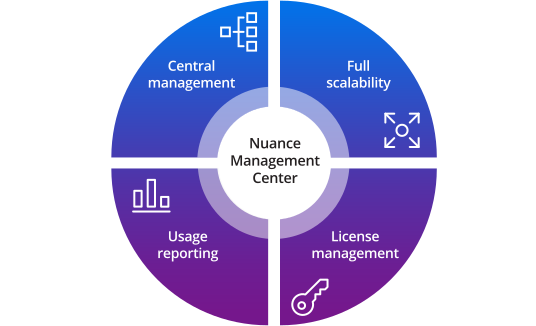
Cut costs with Nuance Management Center
Nuance Management Center (NMC) allows your IT department to easily track employee usage of Dragon Legal, redistribute licenses based on usage, and manage or share customizations—including custom words, commands, and Auto-texts—across multiple users. Dragon Legal v16 speech recognition software, coupled with NMC and goal-driven project management and services, provides a complete solution that increases legal documentation productivity and minimizes support and implementation costs so attorneys can focus on clients.
Download our Nuance Management Center data sheet (pdf. Opens a new window)
Resources
Product resources
- Dragon Legal v16 data sheet (pdf. Opens a new window)
- Dragon Legal v16 feature matrix (pdf. Opens a new window.)
- Dragon Legal v16 command card (pdf. Opens a new window.)
- Nuance Management Center data sheet (pdf. Opens a new window.)
- Dragon Anywhere Mobile data sheet (pdf. Opens a new window.)
- Nuance PowerMic 4 data sheet (pdf. Opens a new window.)